Build your venue layout
Create your event space, add different table shapes and arrange them to match the real venue.
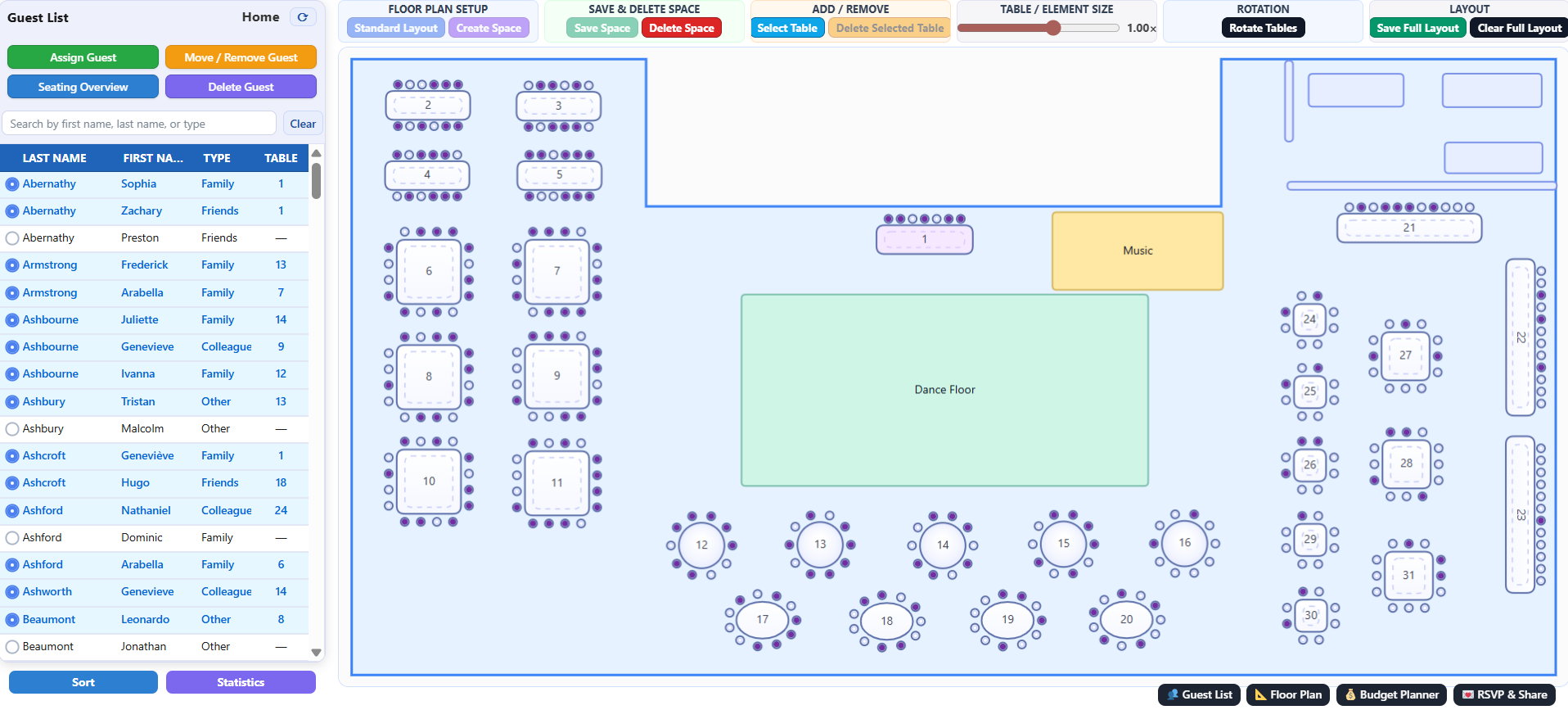
SeatPlanify brings your guest list, floor plan, seating arrangement, RSVP responses and event budget together in one simple browser-based workspace. Start a new project immediately — no installation and no registration required to begin.
SeatPlanify combines your venue layout, tables, seats, guest list, RSVP responses and event budget in a single project. Every change is saved automatically while you work.
Create your event space, add different table shapes and arrange them to match the real venue.
Add guests manually or import them from Excel. Track guest type, attendance and notes, then move guests directly into the seating planner.
Create a public RSVP link and QR code for your event and follow guest responses directly inside your project.
Track planned costs, actual expenses, paid amounts, suppliers, deadlines and notes.
Move a guest or an entire table in seconds. You never need to rebuild the whole plan when something changes.
When your plan is ready, print the room layout together with your guest list for the venue, restaurant or event organizer.
Open a new project immediately. Registration is only required when you decide to permanently save your project.
Start immediately and build your event step by step. All changes are automatically stored while you work.
Click Start planning. A temporary project is created instantly, without registration.
Build or import your guest list and organize all guest information in one place.
Create your venue space, add tables and assign guests to seats.
When you want to keep the project, create an account or sign in. Your temporary project becomes a saved project.
SeatPlanify works for intimate celebrations, large weddings, corporate events and professional event planning.
Organize families, friends and every guest with a clear visual seating plan.
Birthdays, anniversaries, family celebrations and other private events.
Conferences, gala dinners, seminars and company events.
A practical workspace for wedding planners, event agencies, restaurants and venues.
Seating arrangements often change right up until the day of an event. New guests, cancellations or changes to table sizes can make paper plans and spreadsheets difficult to maintain. SeatPlanify lets you make those changes directly in the visual plan.
Your floor plan and guest information remain together in the same project. You can also track RSVP responses and event costs, then print the finished seating plan when everything is ready.
Quick answers about starting a project, registration, saved projects, RSVP, printing and supported devices.
No. You can start a temporary project immediately without registration. Registration or sign-in is required only when you want to permanently save the project.
Yes. Changes made inside your active project are automatically stored. A temporary project must still be saved to your account if you want to access it later.
Yes. Guests, tables and other layout elements can be moved and adjusted throughout the planning process.
Your project can provide a public RSVP link and QR code that guests can use to respond. RSVP responses can then be reviewed from within the project.
Yes. A created and saved seating plan can be prepared for printing together with the relevant guest information.
Mobile devices have limited functionality. SeatPlanify is primarily designed for creating and editing seating plans on desktop and laptop computers.
Create your venue layout, organize guests, track RSVP responses and manage your event budget. Register only when you want to permanently save your project.